Fast & Keyrious LLC
Call 821-203-4949
How to connect a mobile locksmith invoice to your insurance claim
Instead of repeatedly sending disconnected receipts, organize your locksmith invoice for insurance claim submission around the incident, the completed service, and proof of payment. Then attach that packet to the insurer’s designated claim or reimbursement request, keeping the submission confirmation with your records.
TL;DR
A locksmith invoice for insurance claim submission documents the service; your policy determines coverage.
Fastkeyrious provides mobile locksmith services, not insurance coverage decisions.
Keep the itemized invoice, proof of payment, and incident details together for reimbursement.
Confirm the correct submission route before opening a claim or arranging nonemergency work.
Why this matters
An invoice explains what the locksmith did. It does not establish that your insurance covers the work. Your insurer needs to connect the service to an eligible incident and the applicable policy or assistance benefit.
Fastkeyrious mobile locksmith services are best for customers who want to speak directly with the arriving technician rather than a dispatch center. That direct conversation helps you explain whether you need vehicle entry, replacement keys, rekeying, or another confirmed service. Insurance eligibility remains a separate decision.
Start with Fastkeyrious for the service conversation. Confirm the exact job address: the approved service area extends up to 42 miles from Greenville, South Carolina, with each location checked individually.
Use this 2026 workflow to keep the service request and insurance submission connected without treating either one as a guarantee of reimbursement. The goal is a clear record, not extra paperwork for its own sake.
Before you start
Have access to your policy and the correct benefits contact. Find your policy number, any existing claim number, and the insurer’s instructions for locksmith expenses. Ask whether the expense belongs under roadside assistance, another reimbursement benefit, or an existing incident claim.
Gather the service records. Keep the invoice, payment receipt, incident date, service address, and a factual description of what happened. For vehicle work, record the vehicle details requested by the insurer without putting unnecessary personal information in an unsecured message.
Check authorization before arranging nonemergency work. Some benefits require an approved provider or advance authorization. Ask whether independently arranged service qualifies, what documents are required, and which submission deadline applies.
The authorization question is the gotcha. An accurate, paid invoice cannot replace a benefit requirement that your policy imposes. If someone is in immediate danger, contact emergency services first; do not delay an urgent safety response to organize a claim.
There is no universal insurance upload screen. This guide describes the actions to take rather than naming buttons that differ between insurers. Follow the actual labels and document requirements shown in your account or supplied by your claims contact.
Policy and submission route
Choose the right destination
Describe the incident before naming the expense. Explain whether keys were locked inside a vehicle, keys were lost, a lock was damaged, or another event occurred. These are different situations, even when all involve a locksmith.
Ask which benefit applies. Have the insurer identify the relevant coverage or assistance provision. Do not assume that a lockout benefit also pays for replacement keys, programming, or new lock hardware.
Confirm the submission route. Ask whether to use an existing claim, a separate reimbursement request, or the assistance provider’s process. Get the reference number and the destination for supporting documents.
Record the instructions. Save written directions when available. If you receive instructions by phone, note the date, the contact’s name, and the requested documents in your own records.
Expected result: You know where the invoice belongs, which reference number to use, and what the insurer needs to review it. You have not mistaken a service receipt for proof of coverage.
Compare the submission options
Use the route your insurer specifies, not whichever option looks easiest. This 2026 checklist separates document delivery from benefit eligibility.
Existing claim attachment
Best for: Locksmith work connected to an incident already reported
Advantage: Keeps supporting records with the incident
Limitation: The expense still needs its own coverage review
Separate reimbursement request
Best for: A benefit with a distinct reimbursement process
Advantage: Follows the benefit’s document requirements
Limitation: An ordinary claim upload is not necessarily the correct destination
Submission through a designated claims contact
Best for: A case requiring explanation or document corrections
Advantage: Lets you clarify what the reviewer needs
Limitation: You must use the approved contact method and retain confirmation
Do not submit the same expense through several routes just to increase the chance of payment. Ask which route is correct and whether another benefit has already paid any part of the expense. Accurate reporting prevents conflicting records.
Invoice and evidence packet
Check the service description
Read the invoice against the completed work. Confirm that the customer information, service date, job location, and service description are accurate. Ask the locksmith to correct factual errors before you submit it.
Separate distinct services. If the visit included entry and replacement keys, request an accurate breakdown rather than a vague description such as locksmith work. Do not ask the technician to relabel a service to fit a benefit.
Check the vehicle or property details. For vehicle work, confirm the identifying details your insurer requests. For property work, make sure the invoice identifies the relevant service location rather than only a billing address.
Keep payment evidence. Retain a receipt or another payment record that connects to the invoice. An estimate describes proposed work; it does not demonstrate that the work was completed or paid for.
Expected result: The reviewer can identify the completed service and connect the invoice to the incident without guessing what a broad line item means.
For a vehicle, keep locked-in keys separate from lost-key replacement. Entry into the vehicle and making a replacement key are different services. If replacement is needed, the guide to making a car key without the original explains the service question to discuss with the technician.
For a home or business, distinguish rekeying from lock replacement. Rekeying changes which key operates the existing lock; replacement changes the lock hardware. Your submission should describe what actually happened, not treat the terms as interchangeable.
Build a readable packet
Organize your 2026 submission into 3 record groups: incident information, service documentation, and payment evidence. These are filing categories, not insurer requirements; include any additional records your insurer requests.
Incident information: A short factual account, the incident date, the location, and the relevant claim or benefit reference.
Service documentation: The itemized invoice and any requested supporting records tied to the work.
Payment evidence: The receipt or requested transaction record showing payment for that invoice.
Keep 2 dates distinct: the incident date and the service date. They do not have to match, but each should be accurate. If the work happened later, explain that sequence plainly rather than changing a date to make the documents look consistent.
Check every page for readability. Include the whole document rather than cropping out the provider information, service details, or payment status. Follow the insurer’s file-format instructions, and do not send unrelated identification documents unless specifically requested through an approved channel.
Submission and confirmation
Attach the packet to the correct request
Open the designated claim or reimbursement process. Use the destination confirmed by the insurer. Verify the policyholder and reference number before adding documents.
Attach the requested records. Use readable files with descriptive names, such as locksmith invoice and payment receipt. If you combine documents, keep the incident summary separate from the original invoice content.
Add a short explanation. State what happened, what service was completed, and how the attached invoice relates to the incident. Use facts, not an argument that the policy must pay.
Review before submitting. Check the service date, location, description, attachments, and any declarations you must make. Answer coverage and payment questions accurately.
Save the confirmation. Keep the acknowledgment, submission date, and reference number with the same records. If no confirmation appears, check the account or contact the designated representative before sending duplicates.
Expected result: Your documents are associated with the correct request, and you have a record of submission. A successful upload confirms document delivery, not claim approval.
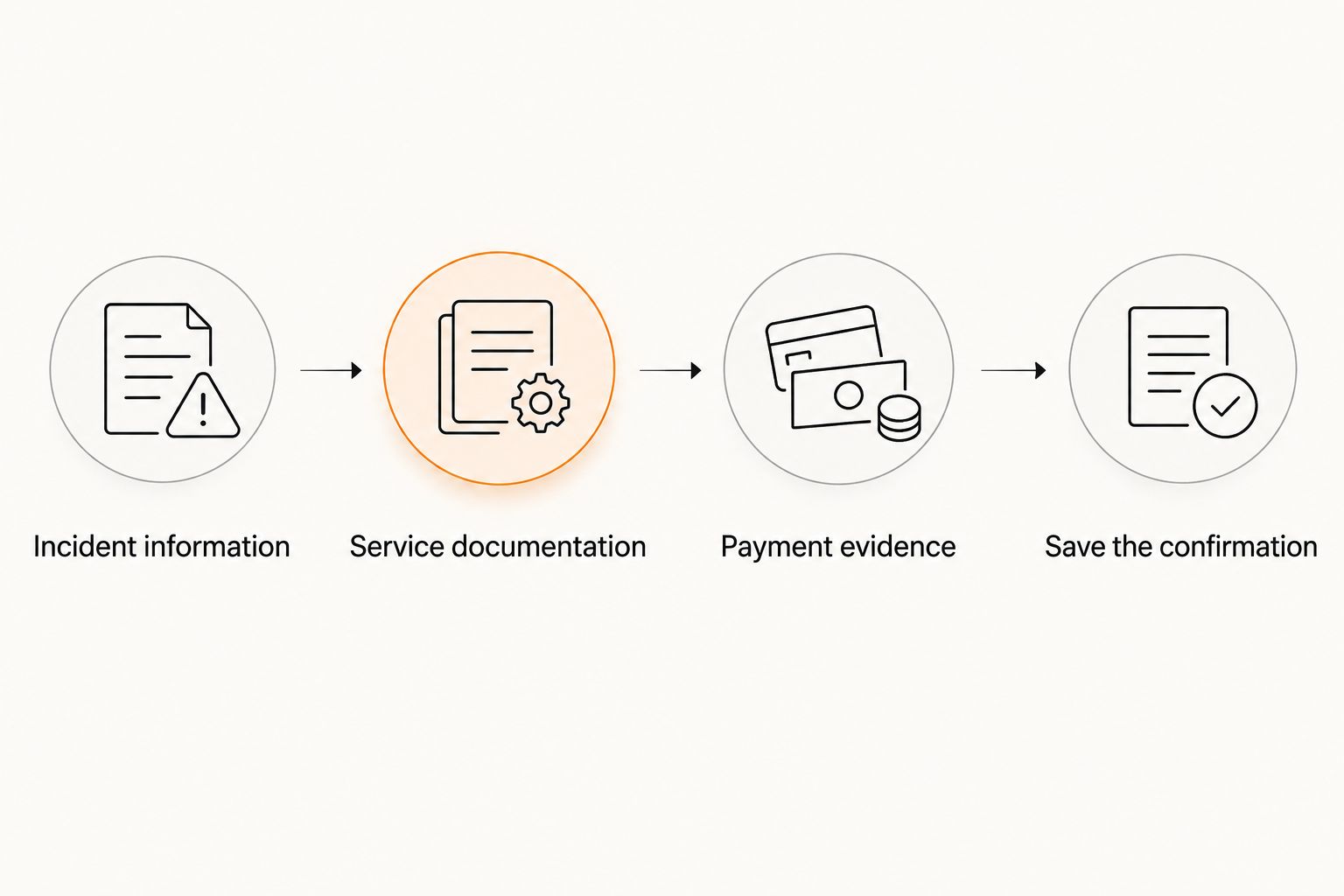
Keep the confirmation with the same records as the invoice and payment evidence.
Use a factual summary that answers the reviewer’s basic questions: what happened, where it happened, and what the locksmith completed. Mention whether you are attaching an original invoice or a corrected version. Do not add a diagnosis, damage claim, or theft allegation that you cannot support.
Track the request without guessing a deadline
Ask when and how you should check the status. Follow the deadline stated in your policy or the insurer’s written instructions; there is no single submission or reimbursement timeline that applies to every locksmith expense.
When checking a 2026 submission, use the reference number and submission date. Ask whether the documents were received, whether anything is missing, and what the next action is. A request for more documentation is different from a coverage denial, so read the message before resending everything.
When the locksmith invoice is updated
A corrected invoice is an adjacent workflow, not a new incident. Use it when the original document contains an error or the insurer requests clearer service details.
Ask for a factual correction. Identify the incorrect date, address, customer detail, or service description. Keep the request limited to what the technician can accurately document.
Preserve the original. Retain both versions in your personal records. Do not edit the provider’s invoice yourself.
Submit the corrected version through the approved route. Explain that it replaces the earlier invoice and identify the existing reference number.
Confirm how the reviewer will treat it. Ask whether the earlier version remains visible and whether any additional payment evidence is needed.
Expected result: The reviewer knows which invoice to use without interpreting the correction as a second charge or another incident.
If additional work is completed later, describe it as additional work. Do not fold a new service into the original description without a clear record. Ask the insurer whether the new expense belongs with the existing submission before uploading it.
Troubleshooting
The invoice only says locksmith service
Ask the provider for an accurate description of the completed work. Vehicle entry, key replacement, programming, rekeying, and lock replacement should not be treated as identical services. Keep any explanation consistent with the original job.
The uploaded file is unreadable or rejected
Check the insurer’s accepted file formats and size limits. Rescan or photograph the entire page with readable text, then use the permitted format. Do not repeatedly upload the same rejected file without correcting the cause.
The payment record does not match the invoice
Review the customer name, transaction details, and payment status. If another person paid, explain that fact and ask what supporting evidence the insurer requires. Do not alter either record to create a match.
The insurer says authorization was required
Request the applicable benefit terms and the reason for the decision. Ask whether a review process exists and what documentation it accepts. A locksmith cannot override your insurer’s authorization rules or promise reimbursement.
The same expense appears in multiple submissions
Contact the designated claims representative and identify each reference number. Explain that the records concern the same expense and ask how to correct the duplication. Disclose any payment already received through another benefit.
Customize your workflow
Keep the same document structure for vehicle, residential, and business work, but change the incident details to match the job. Fastkeyrious mobile locksmith services cover confirmed automotive, residential, and commercial needs; the technician confirms the exact service, while the insurer determines benefits.
For an office or business lockout, record the suite or entrance involved and who authorized the work. Distinguish a physical lock problem from an electronic-access problem. Do not describe access-control installation as completed work unless it actually occurred and is documented.
For vehicle work, confirm the model year, key type, and requested service before discussing replacement or programming. The client's confirmed Ford Transit services do not establish compatibility with every year or key system. Keep the invoice specific to the work the technician completed.
Direct technician contact is useful for explaining the service. The limitation is clear: Fastkeyrious does not decide whether an insurer covers that service. Keep both conversations separate, then connect them through accurate records.
Discuss the service with a technician
Explain the lock or key problem and confirm the exact job location before arranging service.
FAQ
What should a locksmith invoice for an insurance claim include?
A locksmith invoice should accurately identify the provider, customer, service date, job location, completed work, and charges. Ask your insurer which additional details and payment evidence it requires for the applicable benefit.
Does insurance cover a mobile locksmith invoice?
Coverage depends on your policy, the incident, and the benefit requirements. A paid locksmith invoice documents an expense; it does not guarantee reimbursement.
Should I contact insurance before calling a locksmith?
For nonemergency work, check authorization and provider requirements before arranging service. If someone is in immediate danger, contact emergency services first rather than delaying a safety response for insurance paperwork.
Can I submit a locksmith estimate instead of a paid invoice?
An estimate is not proof of completed or paid work. Submit an estimate only when the insurer requests one for authorization or review, and ask which final records are needed afterward.
Are locked-in car keys and lost-key replacement the same insurance expense?
No, vehicle entry and lost-key replacement are different services. Ask whether your benefit covers the specific work, including any separately documented programming.
Can Fastkeyrious guarantee that my insurer will reimburse me?
No, Fastkeyrious provides locksmith services, while your insurer determines coverage. Confirm the benefit terms and submission requirements directly with the insurer.
What should I do if the insurer denies the locksmith expense?
Request the written reason and the applicable policy or benefit terms. Follow any available review process and submit accurate supporting documents through the insurer’s designated channel.
One last thing
The most useful invoice is accurate, not rewritten to sound covered. An entry-only job should remain an entry-only job even if your policy treats replacement keys differently. Changing the service description creates a discrepancy rather than solving the coverage question.
Before closing your 2026 records, make sure you can trace one incident to its service invoice, payment evidence, submission confirmation, and final decision. That clear chain is the practical connection between a mobile locksmith visit and an insurance request.