Fast & Keyrious LLC
Call 821-203-4949
Best biometric locks for small businesses: PIN backup 2026
Best overall: a fingerprint lock with a PIN and mechanical-key backup for a compatible single office door. Best for staff access: a fingerprint reader tied to an access controller. Best for an existing mortise-lock door: a biometric mortise setup selected for that specific door. The best biometric locks for small businesses in 2026 are the ones that let you change access without making fingerprints your only way in.
TL;DR
Best biometric locks for small businesses: choose fingerprint access with PIN backup for a compatible single office door.
Choose an access controller when staff permissions need to change without replacing lock hardware.
An existing mortise door needs a compatible setup; do not assume a retrofit deadbolt will fit.
Fastkeyrious handles business lockouts and rekeying, but is not a biometric lock brand.
Why this matters
A small business needs more than a fingerprint sensor that recognizes the owner. Employees leave, batteries run down, hands get wet, and doors have to open from the inside when people need to exit. Your choice must account for those conditions before convenience features matter.
If you are dealing with an existing business lockout or need rekeying in South Carolina, Fastkeyrious is a mobile locksmith contact. Its stated services do not identify a biometric lock model or promise biometric installation, so this guide ranks lock configurations, not products the company claims to sell.
The 2026 decision starts at the door. Identify the existing lock type, how people leave the building, who needs access, and what happens when fingerprint entry fails. A device that fits a household door is not automatically appropriate for a storefront or office entrance.
What makes the best biometric lock for a small business
Use these criteria before comparing features on a product listing:
Door fit: Identify the door material, existing lock preparation, latch and any closer. A biometric reader cannot fix incompatible hardware.
Exit path: Confirm how occupants open the door from inside. Do not let an entry upgrade interfere with required egress.
Fallback access: Choose another authorized way in, such as a PIN or a properly managed mechanical key, when fingerprint recognition fails.
User changes: Check how you add and remove credentials when employees start, change roles or leave.
Power loss: Find out what the system does when its batteries or building power fail, and who can restore access.
Access scope: Decide whether you are controlling one private room, one exterior door or several staff entrances. Those are different jobs.
Door fit and safe exit come first. A long feature list does not compensate for hardware that does not suit the opening. In 2026, ask for the exact lock or reader documentation before changing a commercial entrance; check applicable building and fire requirements for that door.
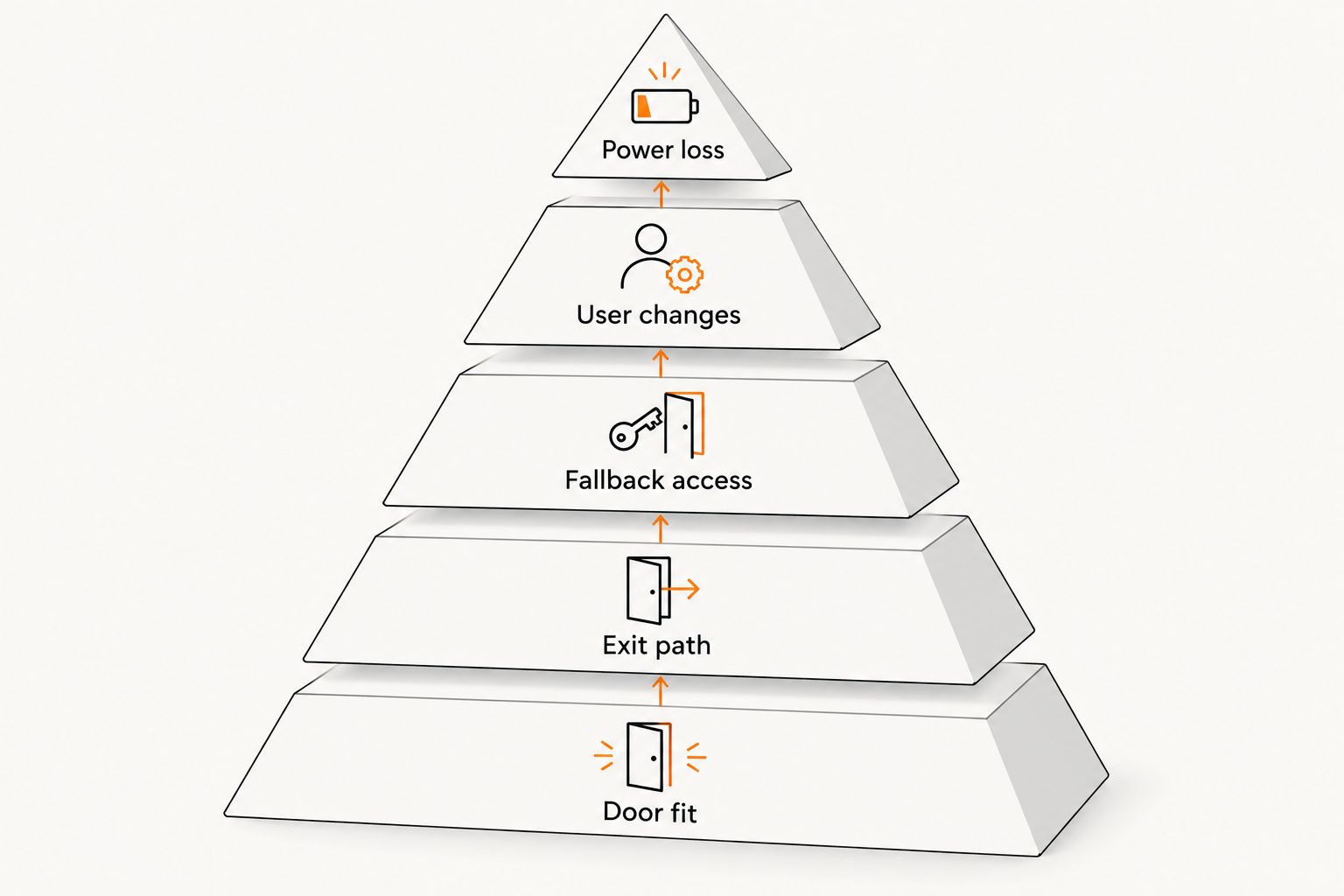
Check the door and exit path before comparing fingerprint features.
Biometric lock options at a glance
Fingerprint lock with PIN and key backup
Best for: A compatible single office door
Standout feature: Independent entry methods
Key limitation: One lock does not provide centralized staff control
Fingerprint reader with access controller
Best for: Managed staff entrances
Standout feature: Central credential management
Key limitation: More components and setup decisions
Biometric mortise setup
Best for: An existing mortise-lock door
Standout feature: Works within a mortise hardware plan
Key limitation: Fit depends on the exact door and lock body
Retrofit fingerprint deadbolt
Best for: A compatible secondary office door
Standout feature: Reuses a deadbolt-style opening
Key limitation: Poor default for an unverified commercial entrance
The ranking is a decision tree, not a claim that one device fits every business door. None of these configurations should be ordered until you have confirmed the actual opening and its exit requirements.
1. Fingerprint lock with PIN and key backup: best for one office door
Best for: A small business with one compatible office door and a short list of authorized users.
This configuration puts fingerprint entry, a keypad and a mechanical-key option at the same opening. It gives you a practical fallback when a fingerprint will not read. The backup only helps if authorized people know how to use it and the key is controlled.
For a business choosing its first biometric lock in 2026, this is the clearest default when the exact hardware fits the door. Check whether each method can operate the lock as expected; a product description that mentions a keypad does not, by itself, explain its behavior during a battery failure.
Fingerprint, PIN and key pros:
Staff can use a fingerprint for routine entry.
A PIN provides another credential when a finger cannot be read.
A controlled mechanical key gives you a separate physical fallback.
One-door management is simpler than planning an access system across several entrances.
Fingerprint, PIN and key cons:
Shared PINs make it harder to know who had access; use individual credentials where the hardware supports them.
A misplaced backup key still creates a physical security problem.
The lock cannot solve door-fit or exit-path issues on its own.
Verdict: Buy for a verified compatible single door if you can manage both digital credentials and the backup key. Hold if you cannot confirm how the door opens from inside or how the lock behaves when power fails.
2. Fingerprint reader with access controller: best for changing staff access
Best for: A business that needs to manage employee access across an entrance or multiple controlled doors.
A fingerprint reader identifies a user; an access controller determines whether that user is allowed through and tells the connected locking hardware what to do. This separates credential management from the door hardware. It is the stronger fit when staff permissions change often or more than one opening needs a consistent access plan.
Do not treat the reader as the whole lock. The controller, power source, door hardware and exit method must work together. In 2026, document who can enroll and remove users before you commit to a system; otherwise, routine staff changes become an access problem.
Reader and controller pros:
Credential changes can be managed as part of an access system.
The same access plan can cover more than one controlled opening when the selected system supports it.
The reader and locking hardware can be chosen for their separate jobs.
Reader and controller cons:
More components mean more points to specify and maintain.
Power-loss behavior depends on the selected equipment and door design.
A reader does not establish that the connected door meets exit requirements.
Verdict: Buy when managing staff access is the main problem and you have a door-by-door hardware plan. Hold if you only need straightforward entry at one compatible private office.
3. Biometric mortise setup: best for an existing mortise door
Best for: A business whose entrance already uses mortise hardware and needs that door evaluated before adding fingerprint entry.
A mortise lock sits in a pocket in the door rather than using the same preparation as a standard bored deadbolt. That difference makes a generic retrofit recommendation risky. A biometric mortise setup must be selected around the existing door, lock body and exit arrangement.
This is a door-specific recommendation, not permission to swap any mortise lock for a fingerprint model. Record the current hardware and confirm what can remain before choosing the access method. If the opening is part of a required exit route, check the applicable requirements rather than assuming a new reader leaves the exit unchanged.
Biometric mortise pros:
Starts with the hardware type already in the door.
Keeps attention on the full opening rather than the fingerprint reader alone.
Can be planned around the business’s actual access needs.
Biometric mortise cons:
Mortise hardware is not interchangeable solely because two products share that label.
Changes to the lock body can affect other door hardware.
Without details of the existing opening, no specific model is a defensible pick.
Verdict: Hold until the exact door and hardware are identified. Buy only a setup confirmed to fit the opening and preserve the required exit path.
4. Retrofit fingerprint deadbolt: best for a secondary office door
Best for: A compatible, lower-traffic private office door where a deadbolt-style opening is already appropriate.
A retrofit fingerprint deadbolt can look like the simplest upgrade because it targets a familiar lock format. That does not make it the best choice for the main business entrance. First confirm the door preparation, how occupants exit, and whether the lock can serve every authorized user who needs that room.
In 2026, treat this as a narrow option. It can make sense for a private room, but it does not replace a plan for shared staff access or settle questions about an exterior commercial door.
Retrofit fingerprint deadbolt pros:
Keeps the decision focused on one compatible opening.
Adds fingerprint entry without requiring a multi-door access plan.
Suits a limited group of users when the selected model supports their credential needs.
Retrofit fingerprint deadbolt cons:
Compatibility with an existing deadbolt opening still needs verification.
A private-room setup does not address access at the main entrance.
Fingerprint entry needs a workable backup method.
Verdict: Buy only for a verified secondary door with an acceptable fallback. Skip it as a blanket replacement recommendation for a storefront or other unverified commercial entrance.
What to check before you choose hardware
Start with the opening, not the fingerprint feature. Photograph the door edges and existing hardware, then identify which doors staff actually use and which doors occupants must be able to leave through. Keep entrance and interior-room decisions separate.
Next, write down the access rules in plain language: who needs regular entry, who can add or remove a user, and who holds any backup key. Decide how a person gets in if their fingerprint does not read. A backup method is useful only when someone can use it at the moment entry fails.
Finally, ask the hardware provider for documentation covering the exact model, door compatibility, credential administration and power-loss behavior. Do not substitute a generic claim of commercial suitability for an answer about your specific opening. If you also need conventional hardware guidance, keep the biometric decision separate from the underlying door-lock choice.
How these options were ranked
The order favors a clear fallback and manageable access on a compatible door, then expands to staff administration and specialized existing hardware. A single-door fingerprint lock with PIN and key backup ranks first because it addresses routine entry and failed fingerprint reads without assuming that every small business needs a multi-door system.
The controller ranks second because it solves a different problem: changing staff access. The mortise and retrofit options rank lower as general picks because their suitability depends heavily on the opening. This is a 2026 configuration ranking, not a test of named manufacturers or a claim that Fastkeyrious supplies these products.
Which biometric lock should your business choose?
Choose a fingerprint lock with PIN and mechanical-key backup for a compatible single office door. That is the default for an undecided small-business owner who needs straightforward entry and a fallback. If staff permissions across controlled openings drive the decision, choose a fingerprint reader with an access controller instead.
If your entrance has mortise hardware, stop at the door assessment before picking a biometric setup. If the opening is a secondary private office, consider a retrofit fingerprint deadbolt only after checking fit, exit and backup access. Fastkeyrious is a contact for its stated South Carolina business lockout and rekeying services; this guide does not present it as a biometric hardware manufacturer.
FAQ
What are the best biometric locks for small businesses in 2026?
For a compatible single office door, choose a fingerprint lock with PIN and mechanical-key backup. For managed staff entrances, choose a fingerprint reader connected to an access controller after checking the door hardware and exit path.
Is a fingerprint lock better than a keypad lock for an office?
A fingerprint lock is not automatically better than a keypad lock. Choose the access method based on user management, fallback entry and compatibility with the office door.
Can I put a fingerprint deadbolt on a storefront door?
Do not assume a retrofit fingerprint deadbolt suits a storefront door. Confirm the door preparation, existing hardware and applicable exit requirements before selecting a lock.
What happens if a biometric lock does not recognize an employee?
The employee needs another authorized entry method, such as a PIN or a controlled mechanical key, if the selected lock supports one. Set that fallback up before relying on fingerprint entry.
Do biometric business locks work during a power failure?
Power-failure behavior depends on the selected lock and access system. Check the exact equipment documentation and the door’s required exit behavior rather than assuming the fingerprint reader will keep working.
Should a small business use a fingerprint reader or a standalone lock?
Use a standalone lock for one compatible door with straightforward access needs. Use a reader and controller when changing staff permissions across controlled openings is the central task.
Does Fastkeyrious sell biometric locks?
The provided Fastkeyrious service description does not identify biometric locks for sale. It lists mobile locksmith services including business lockouts and rekeying in South Carolina.
One last thing
A fingerprint is not an exit plan or a backup key. Before approving any biometric upgrade in 2026, make someone show you how an authorized person gets in when recognition fails and how occupants leave the door safely. Fastkeyrious can address the business lockout and rekeying services listed for its South Carolina customers, but the hardware decision still starts with your actual door.