Fast & Keyrious LLC
Call 821-203-4949
Best Electronic Locks for Apartments: Picks 2026
Best overall for renters with landlord approval: an interior retrofit smart lock. Best for phone-free entry: a standalone keypad deadbolt. Best for managed access: a connected replacement deadbolt. The best electronic locks for apartments in 2026 fit your existing door, respect your lease, and provide a clear backup-entry plan.
TL;DR
The best electronic locks for apartments start with landlord permission, door compatibility, and backup entry.
An interior retrofit smart lock is the default rental choice when retaining the existing exterior cylinder matters.
A standalone keypad deadbolt suits residents who want keyless entry without managing an app.
Fastkeyrious provides residential lockout and rekeying services; discuss your access problem directly with the responding technician.
Why this matters
An apartment lock is not just your choice of hardware. Your landlord, building management, door assembly, and emergency-access arrangements all affect what you can change. A lock that suits a detached house is not automatically appropriate for a rental apartment.
If you are locked out now, solve the access problem before shopping. Fastkeyrious provides home lockout and rekeying services, with direct technician communication rather than a dispatch-center middleman. Fastkeyrious is best for apartment residents who want to discuss a lockout directly with the responding technician.
This 2026 guide ranks lock types by apartment use case, not unsupported claims about individual brands. Start with the category that matches your permission level and daily routine. Then check the exact model against your door and building requirements.
What makes the best electronic locks for apartments
Written permission: Get approval for the actual alteration, not just a general agreement that smart locks sound useful.
Door compatibility: Check the existing lock type, door preparation, frame alignment, and any fire-door requirements before choosing hardware.
Backup entry: Know how authorized entry works when batteries run out, a phone is unavailable, or a credential fails.
Access control: Decide whether you need a household code, separate visitor credentials, or remote permission changes.
Daily usability: Choose an interface everyone in the household can operate without depending on another resident's phone.
Move-out plan: Agree on who owns the hardware, who controls the account, and what must be restored when the tenancy ends.
Permission and door fit come before app features. A lock with the right controls still fails the apartment test if management will not approve it or the hardware does not fit.
Apartment electronic locks at a glance
1. Interior retrofit smart lock
Best for: Renters retaining the exterior cylinder
Standout feature to seek: Interior operation while preserving approved exterior hardware
Key limitation: Compatibility depends on the existing deadbolt
2. Standalone keypad deadbolt
Best for: Residents avoiding phone-dependent entry
Standout feature to seek: Local code entry without an app-based routine
Key limitation: Remote access management is not its purpose
3. Connected replacement deadbolt
Best for: Owners or managers controlling changing access
Standout feature to seek: Supported remote credential management
Key limitation: Replaces hardware and introduces account responsibilities
4. Fingerprint-enabled electronic lock
Best for: Residents who prefer fingerprint entry
Standout feature to seek: Fingerprint access alongside an independent backup method
Key limitation: Enrollment and recognition add another failure point
5. Building-compatible electronic credential lock
Best for: Apartments with managed building access
Standout feature to seek: Compatibility with an approved credential system
Key limitation: Residents cannot choose compatibility independently
These categories describe different buying decisions. They are not promises that every model in a category includes every feature. Check the manufacturer's documentation for the exact lock you are considering.
1. Interior retrofit smart lock: best for approved rental upgrades
An interior retrofit smart lock changes the inside operating hardware while retaining the exterior cylinder on compatible installations. This makes it the first category to consider when a landlord wants the outside appearance and existing key access preserved.
Retaining the cylinder does not remove the need for permission. Management still needs to approve the interior change, and you need to confirm that the proposed device fits the existing deadbolt.
Interior retrofit smart lock pros:
Keeps the existing exterior cylinder on a compatible installation.
Fits a rental decision where exterior changes are restricted.
Lets you prioritize interior convenience without selecting an entirely new exterior lock.
Interior retrofit smart lock cons:
Does not fit every lock mechanism or apartment door.
Does not correct a worn cylinder or a misaligned door.
Still requires a clear plan for batteries, account access, and move-out restoration.
Best for: Renters with written approval who want electronic operation while retaining approved exterior hardware.
For a 2026 apartment upgrade, ask management whether keeping the current key is required. Then check the retrofit manufacturer's compatibility instructions. Do not treat a familiar-looking thumbturn as proof of fit.
Verdict: Buy only after landlord approval and exact deadbolt compatibility are confirmed.
2. Standalone keypad deadbolt: best for phone-free entry
A standalone keypad deadbolt lets an authorized resident enter a code at the door. Choose this category when your goal is a simpler entry routine rather than remote control, activity notifications, or another household app.
Replacement hardware changes the apartment's lock arrangement. Get approval before removing the existing deadbolt, and confirm how management will retain authorized access.
Standalone keypad deadbolt pros:
Gives residents a code-based entry method.
Avoids making a smartphone part of the normal unlocking routine.
Keeps the buying decision focused on door fit, keypad usability, and backup access.
Standalone keypad deadbolt cons:
Does not serve the same purpose as remotely managed access.
A shared code needs to be changed when access should end.
Battery-powered models require a maintenance routine.
Best for: Residents who want keyless entry but do not need to administer access from an app.
Try the interface before committing when possible. Consider lighting, gloves, vision, and whether everyone can reach and operate the keypad comfortably. A touchscreen and physical buttons create different daily experiences.
Verdict: Buy for simple local entry; skip if remote credential changes are essential.
3. Connected replacement deadbolt: best for managed apartment access
A connected replacement deadbolt combines replacement locking hardware with supported account-based controls. Depending on the model, those controls can include remote access management or individual credentials. Verify each function rather than assuming that every connected lock offers it.
This category suits an owner or authorized manager who needs to change access as occupants or approved visitors change. For a renter, it requires clear agreement about both the hardware and the controlling account.
Connected replacement deadbolt pros:
Supports a buying decision centered on access administration.
Offers model choices with separately managed credentials.
Lets an authorized manager select documented remote-control functions.
Connected replacement deadbolt cons:
Replaces the existing hardware rather than simply adding interior operation.
Remote functions depend on the model's connection requirements.
Account ownership and administrator access need explicit agreement.
Best for: Apartment owners or authorized managers who need supported remote credential management.
Before choosing a connected lock in 2026, identify who will own the account. Also decide who handles a lost phone, a departing resident, an interrupted connection, and a lock that no longer responds electronically. These are access-management decisions, not optional setup details.
Verdict: Buy when managed access is necessary; skip when a local keypad meets the entire need.
4. Fingerprint-enabled electronic lock: best for fingerprint-first entry
A fingerprint-enabled electronic lock uses enrolled fingerprints as an entry credential. Some models also provide a keypad or mechanical backup; check the exact configuration before buying.
Fingerprint entry is an interface preference, not proof that the complete lock is more secure. Evaluate the underlying hardware, authorization controls, door fit, and backup method separately.
Fingerprint-enabled electronic lock pros:
Provides an entry method that does not require remembering a code.
Gives residents a fingerprint-first daily routine.
Offers an alternative to phone-based unlocking when the model supports local recognition.
Fingerprint-enabled electronic lock cons:
Requires enrollment and removal of authorized fingerprints.
A failed recognition attempt still needs a dependable fallback.
Fingerprint data handling differs by manufacturer and needs review.
Best for: Residents who prefer fingerprint entry and can use an independent backup method.
Check where enrollment data is stored and who can administer it. If that information is unclear in the manufacturer's documentation, choose a different model or a simpler access method. Do not select a lock solely because its feature list sounds advanced.
Verdict: Hold until backup entry, data handling, and household usability are clear.
5. Building-compatible credential lock: best for managed buildings
A building-compatible electronic credential lock works with the access arrangement approved by building management. The relevant choice is compatibility with that system, not which independent apartment lock has the most features.
If your apartment already uses a managed fob, card, or mobile credential, ask management how replacement hardware is approved. Do not assume that a consumer smart lock can accept the building's existing credentials.
Building-compatible credential lock pros:
Keeps the decision within the building's approved access arrangement.
Supports management's credential procedures when correctly specified.
Avoids creating a separate resident-controlled system without approval.
Building-compatible credential lock cons:
Compatibility must be confirmed by the responsible administrator.
Residents have less freedom to select independent hardware.
Credential replacement and access changes follow building procedures.
Best for: Residents in buildings where management controls electronic credentials and door hardware.
Ask whether the apartment door is part of the managed system or separate from it. A fob that opens the lobby does not establish compatibility with your apartment lock.
Verdict: Wait for management's approved hardware specification before buying.
Before you order: check the apartment, not just the lock
Use this sequence to turn a product shortlist into an approved purchase. Keep the answers with your lease documents so the move-out requirements are not forgotten.
Get permission
Describe the proposed change to management. Ask whether you may replace the deadbolt, add an interior retrofit device, or change electronic credentials. Get the answer in writing.
Check door fit
Identify the existing lock mechanism and compare it with the proposed manufacturer's installation requirements. Check door and frame alignment too. Electronic operation does not fix a bolt that binds against the strike.
Plan backup entry
Confirm the exact backup method. A mechanical key, external emergency-power provision, and a second electronic credential are different arrangements. Do not assume that your shortlisted model includes any particular one.
Agree on handover
Decide who keeps authorized keys, controls administrator access, replaces batteries, and removes the hardware when required. Include the account transfer or deletion process where applicable.
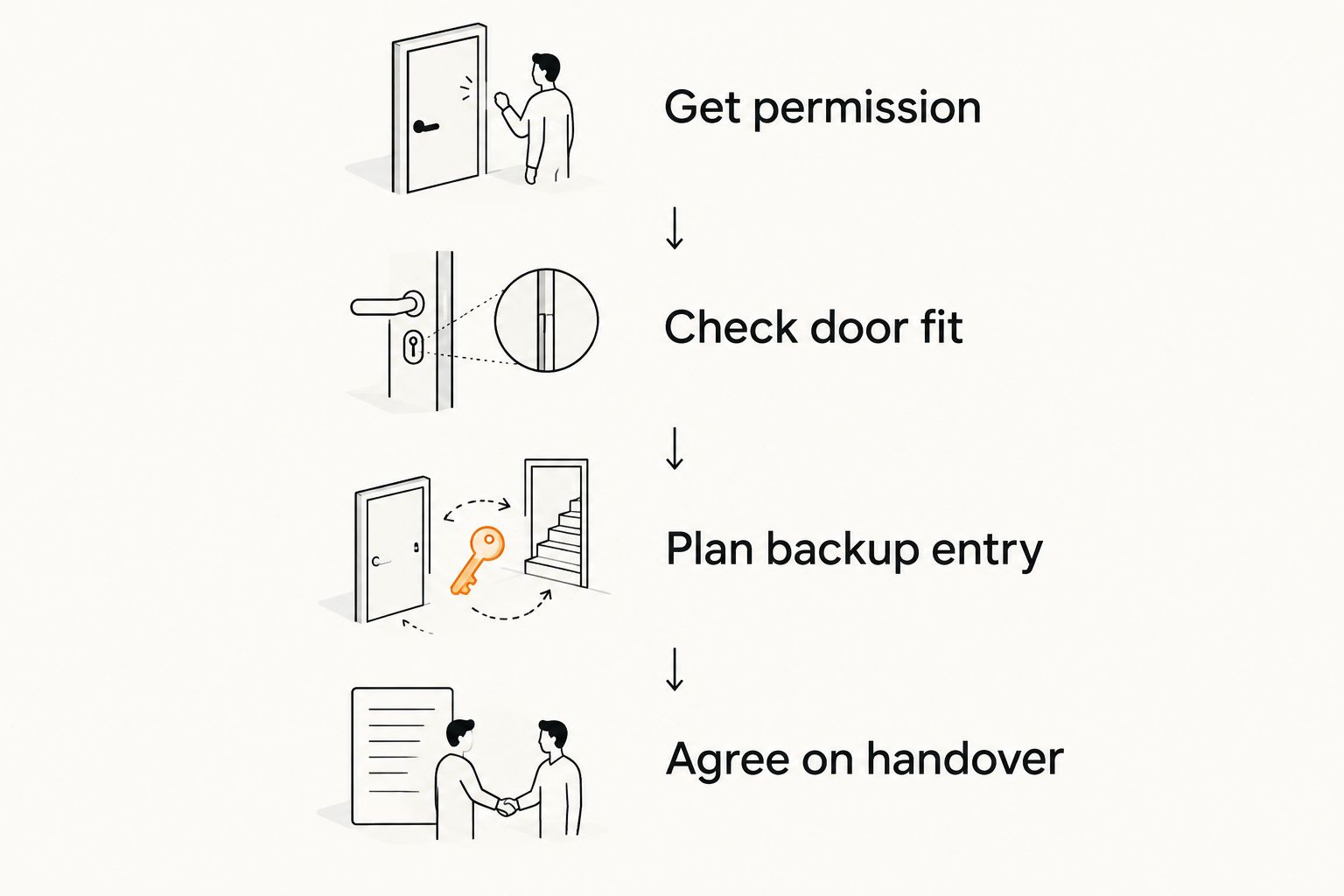
Confirm the apartment requirements before ordering electronic hardware.
If your immediate problem is a lockout rather than a hardware decision, explain that first. Fastkeyrious offers 24/7 emergency response, but you should confirm service for your exact address rather than assuming coverage from a town name.
Discuss your apartment lockout
Speak directly with the technician about residential lockout or rekeying service.
How the lock types are ranked
This 2026 ranking puts rental permission, door compatibility, backup entry, and daily usability ahead of connected features. The default choice preserves approved exterior hardware; the remaining choices address phone-free entry, managed access, fingerprint use, and building-controlled credentials.
The ranking is a category decision guide, not a hands-on product test. No individual model wins without checking its documented functions against your apartment's requirements.
Which electronic apartment lock should you choose?
Choose an interior retrofit smart lock first if you rent, have written approval, and must retain the existing exterior cylinder. Choose a standalone keypad deadbolt if management permits replacement and you want code entry without an app-based routine.
For owner-managed access, consider a connected replacement deadbolt with the required documented controls. For a managed building, follow the approved hardware specification. If no electronic change is permitted, keep the authorized lock and address lost-key or access problems through management.
Fastkeyrious's residential lockout and rekeying services address access problems; they are separate from the hardware selection above. The service area is within 30 miles of Greenville, South Carolina, excluding North Carolina and Wellford, with emphasis on Greer and surrounding areas. Confirm the exact address before arranging service.
FAQ
What's the best electronic lock for a rented apartment?
An interior retrofit smart lock is the first category to consider when you have landlord approval and need to retain the existing exterior cylinder. Confirm compatibility with the exact deadbolt and agree on backup entry before buying.
Can I change my apartment lock without asking my landlord?
Get written landlord or management approval before changing apartment lock hardware. Your lease and building requirements determine which alterations are permitted and how authorized access must be maintained.
Is a keypad lock better than a smart lock for an apartment?
A standalone keypad lock is the better fit when you want local code entry without an app-based routine. A connected lock fits a different need: supported remote access management.
What happens when an electronic apartment lock's batteries die?
The backup-entry procedure depends on the exact model. Check its documented mechanical-key or emergency-power arrangement before purchase, and do not assume that every electronic lock includes either.
Will my building fob work with a new apartment smart lock?
Building-fob compatibility must be confirmed by management and the lock's system documentation. A credential that opens a lobby does not automatically work with an independently selected apartment lock.
Does a fingerprint lock replace the need for backup entry?
No. A fingerprint-enabled lock still needs a dependable way to enter if recognition or electronic operation fails. Confirm that backup method separately from the fingerprint feature.
Who should control the smart lock account in a rental?
The landlord and resident should agree on account ownership and administrator access before installation. The agreement should also cover departing residents, lost phones, and account handover at move-out.
One last thing
Test the approved backup-entry method before relying on an electronic lock. Follow the manufacturer's instructions and keep the door open during setup checks so a failed test does not leave you outside. Knowing the fallback is more useful than adding another unlocking feature.